AI Inbox Add-on
Let agents draft replies, summarize customer intent, generate next actions, and keep the conversation moving without losing human control.
Plan-ready add-on
WAMax CRM helps teams reply faster, organize contacts, launch template broadcasts, automate follow-ups, sell plans, manage branding, connect Meta, and expose developer-ready WhatsApp OTP APIs without a messy tool stack.
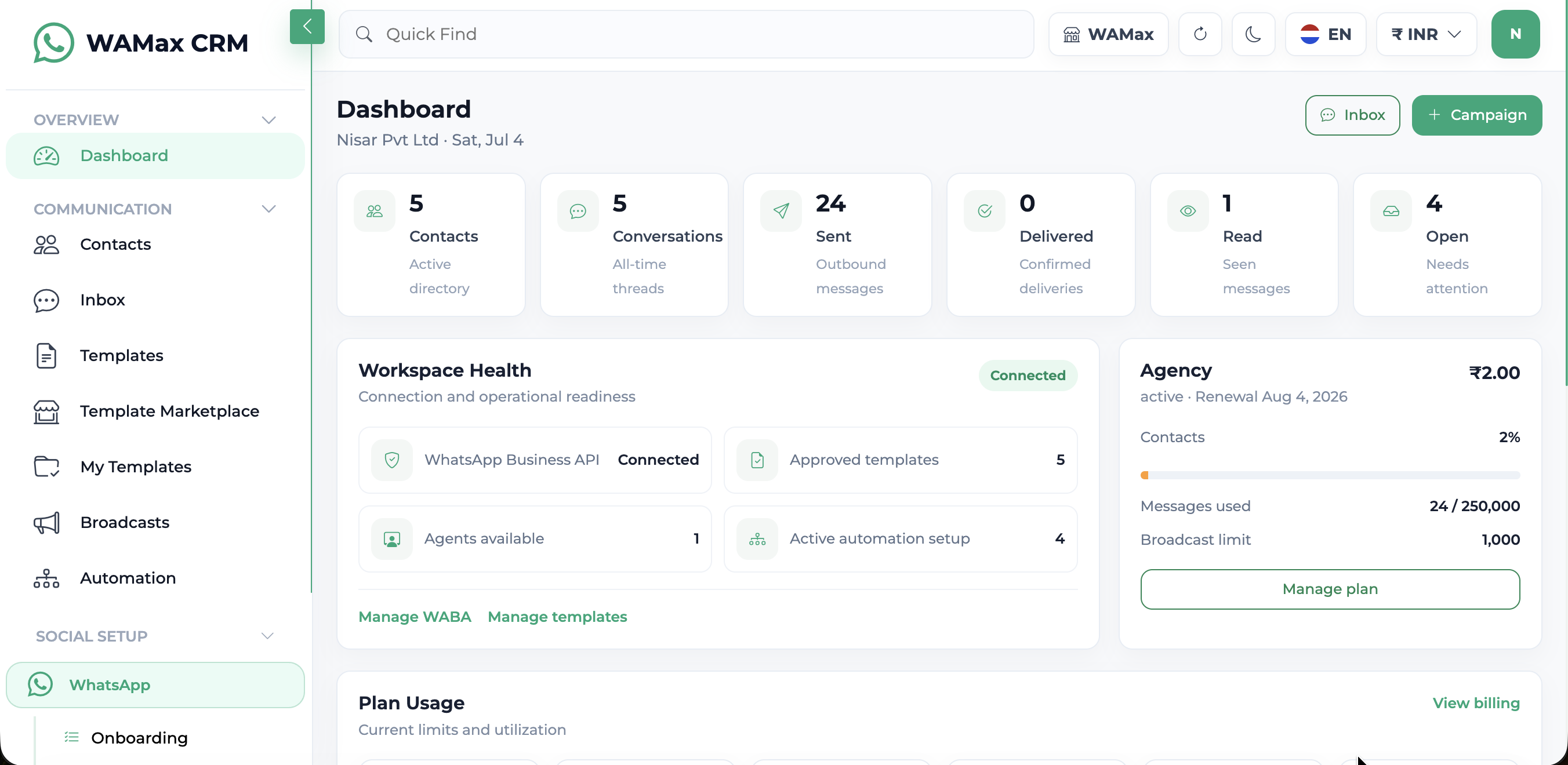
From the first lead message to template re-engagement, OTP verification, broadcast reporting, billing, and tenant controls, the product keeps customer records, conversations, campaigns, templates, developer access, and team actions in one place.
Package the CRM as a complete SaaS: AI assistance, lead capture, OTP APIs, payment checkout, automation, and white-label controls can all be positioned as high-value plan upgrades.
Let agents draft replies, summarize customer intent, generate next actions, and keep the conversation moving without losing human control.
Plan-ready add-onPublish embeddable website forms, verify domains, store submissions, send email notifications, route leads, and create CRM contacts automatically.
Plan-ready add-onGive developers a documented OTP API with applications, keys, verified domains, auth templates, webhooks, logs, and usage limits.
Plan-ready add-onActivate Stripe or Razorpay, show checkout, confirm payment before plan activation, track invoices, and allow upgrades without downgrade confusion.
Plan-ready add-onCreate visual flows for messages, quick replies, templates, tags, webhooks, agents, segments, Google Sheets, and external APIs.
Plan-ready add-onControl branding, logo, favicon, sidebar identity, public pages, SMTP, maintenance mode, and Super Admin tenant visibility.
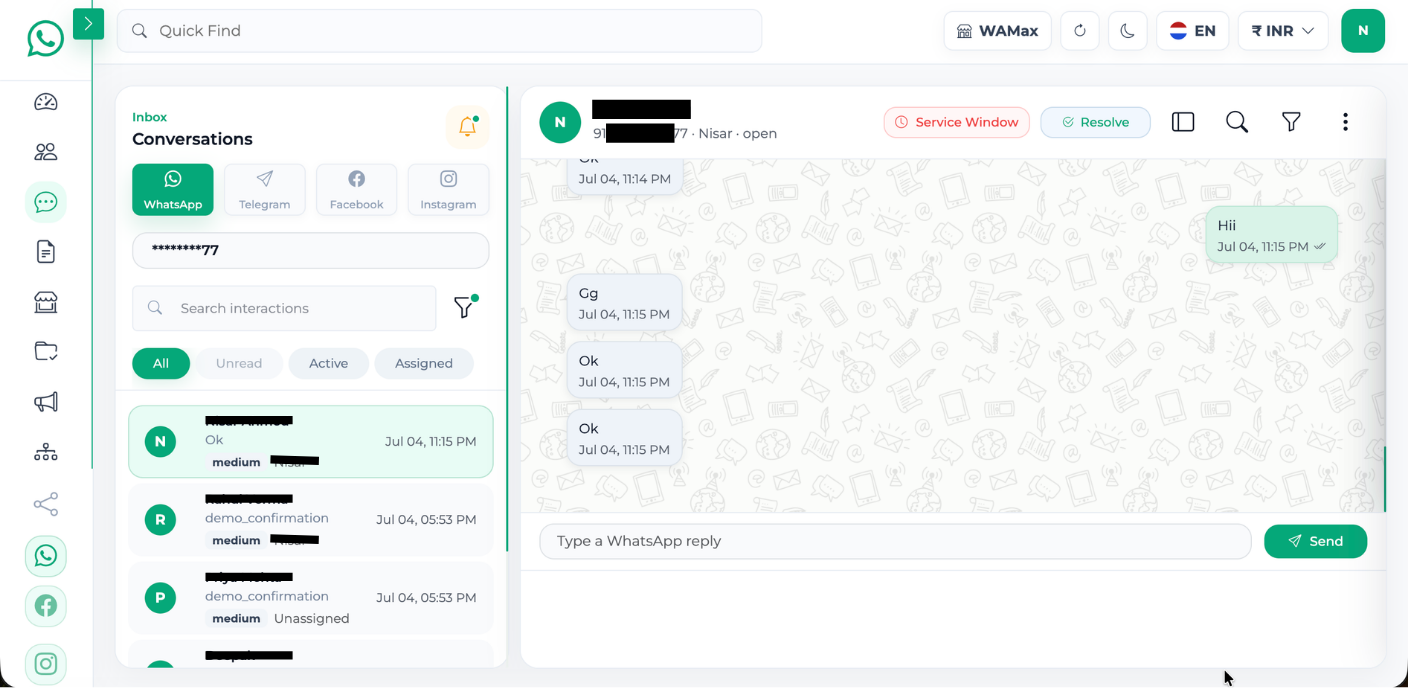
Plan-ready add-onBring WhatsApp, customer context, assignments, internal notes, AI replies, media messages, service-window status, resolved state, search, and chat export into one clean queue.
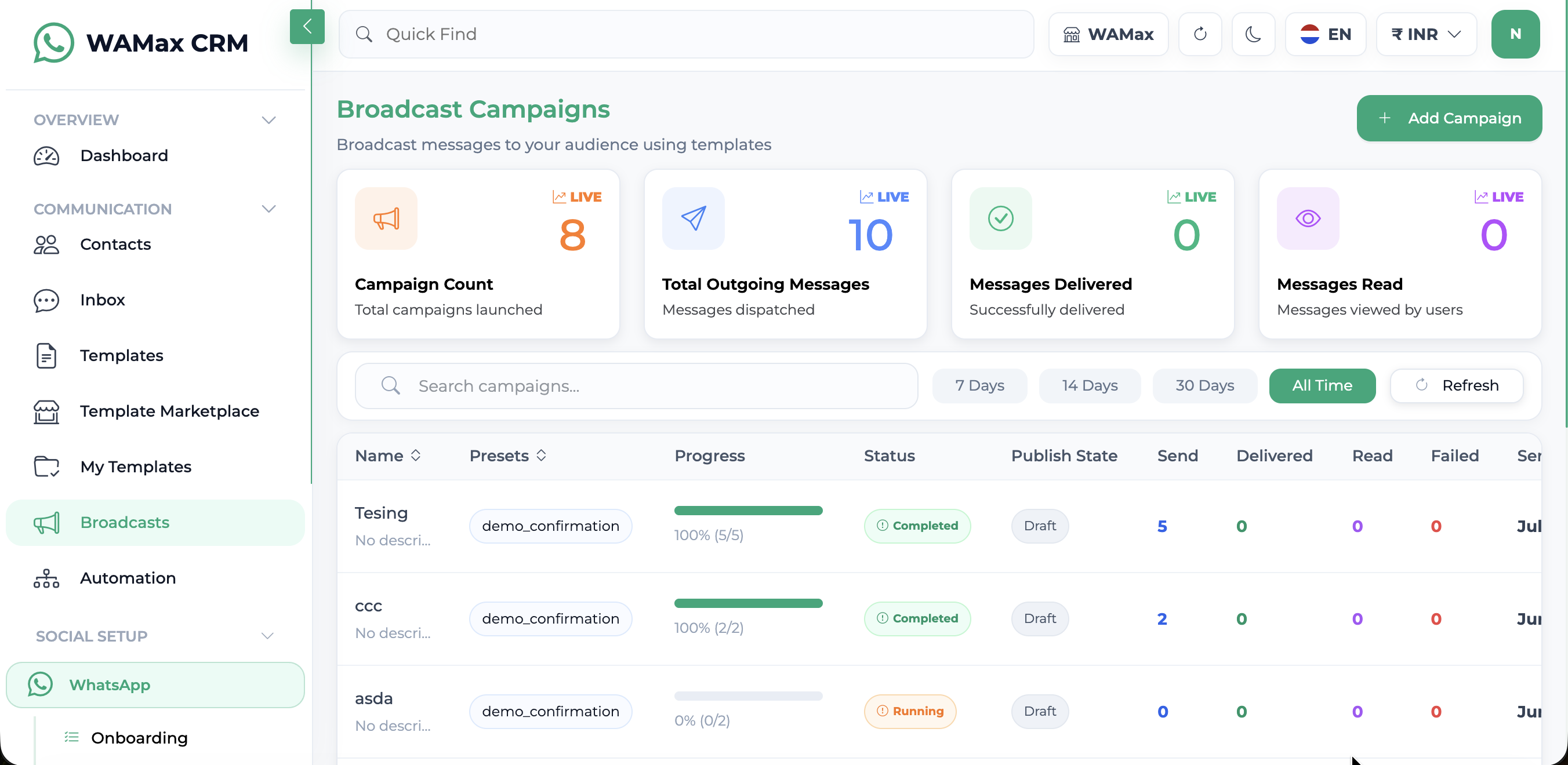
Create multi-step template campaigns, choose audiences, map variables, schedule or launch immediately, save drafts, and track sent, delivered, read, and failed results.
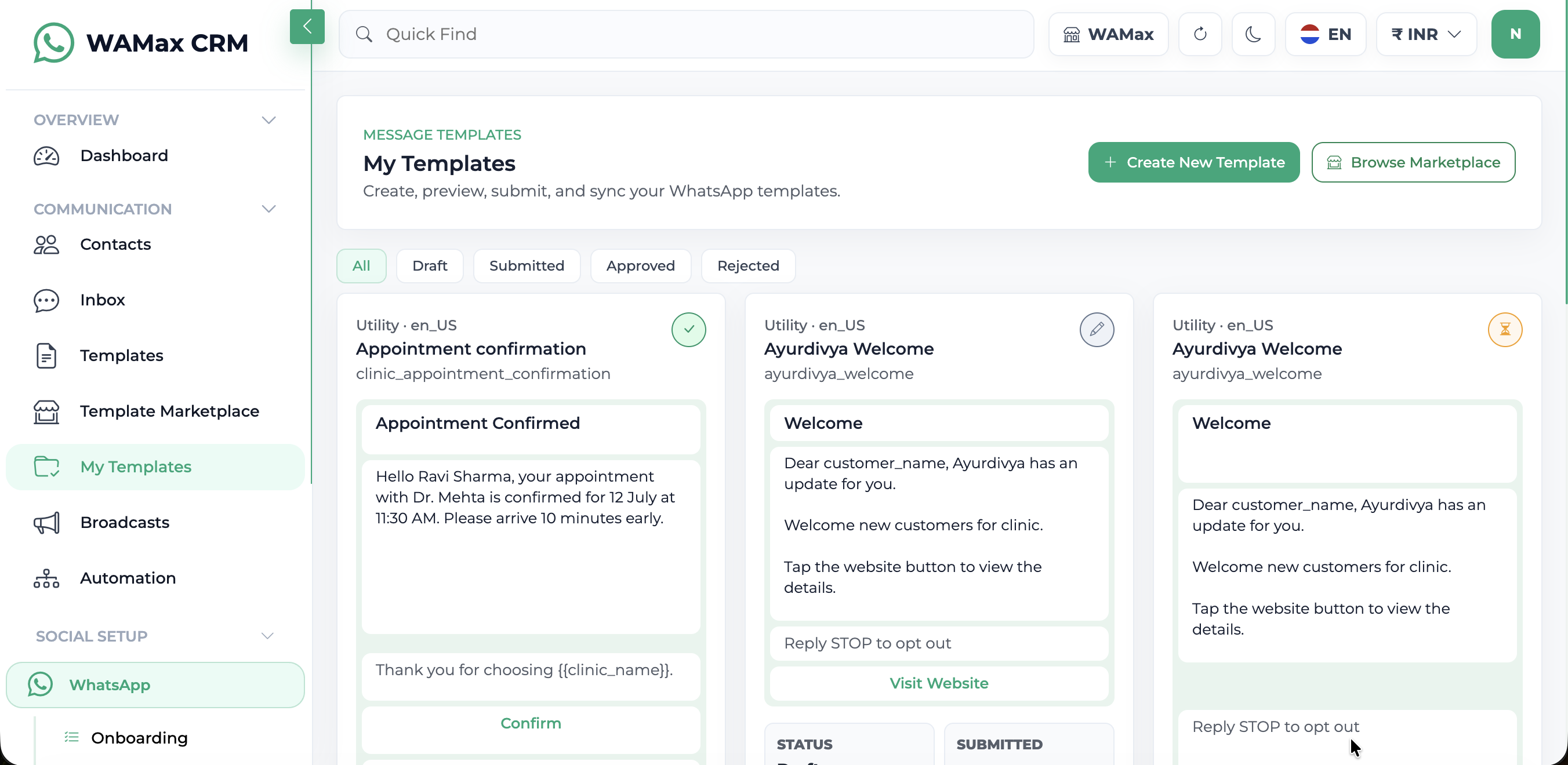
Import marketplace templates, create rich WhatsApp templates, upload media headers, add variables, submit to Meta, sync approval status, and reuse approved templates.
WAMax CRM gives each role a focused surface: agents reply, managers broadcast, owners sell plans, developers integrate OTP, and Super Admin controls the platform.
Resolve/unresolve, search inside chats, export CSV, send media, add emojis, AI suggestions, notes, assignment, priority, and service-window handling.
Draft campaigns, select audience, map variables, preview WhatsApp content, schedule launch, process queues, and track delivery outcomes.
Create templates, add media headers, examples, quick replies, call-to-action buttons, sync Meta approval, and manage rejected/pending/approved status.
Configure plans, modules, gateways, SMTP, branding, AI provider, global Meta settings, tenants/users, payment records, and website leads.
Show visitors the same capabilities your panel offers: inbox, contacts, templates, broadcasts, automation, developer APIs, billing, branding, Meta setup, and Super Admin controls.
CSV import, lead status, source, notes, tags, follow-up dates, and website contact capture.
Masked phone numbers, images, video, audio, documents, emoji replies, AI actions, and internal notes.
Marketplace cards, My Templates, approval badges, media header preview, variable examples, and Meta sync.
Campaign list, draft save, stepper builder, audience targeting, queue processing, and status metrics.
Visual flow builder with toolkit components, triggers, message nodes, tags, agents, APIs, and logs.
Applications, verified domains, API keys, OTP settings, auth templates, webhooks, logs, docs, and usage limits.
Razorpay/Stripe checkout, current plan, usage cards, invoices, upgrades, webhooks, and active-plan protection.
Users, plans/modules, payment gateways, AI providers, branding, Meta global settings, system SMTP, and maintenance mode.
Embedded signup, WABA connection, health sync, template sync, webhook subscription, and phone status.
Logo, favicon, login/register pages, responsive landing, contact, privacy, terms, and deletion instructions.
Keep setup, daily replies, campaigns, automation, OTP APIs, billing, and reporting connected so your team does not lose context between tools.
Connect WhatsApp with Meta Embedded Signup or manual Cloud API credentials, then verify webhook and phone health.
Import contacts, add tags, capture website leads, assign agents, and keep every lead record searchable.
Reply from inbox, send media, use AI assistance, send templates after the service window, and export conversations.
Build workflow automation with nodes for triggers, messages, templates, tags, agents, segments, APIs, and webhooks.
Launch template campaigns safely with recipient selection, variable mapping, schedule controls, drafts, and delivery status.
Review campaign delivery, billing usage, developer API logs, OTP usage, inbox activity, and customer follow-ups.
Capture WhatsApp leads from ads, qualify conversations, schedule follow-ups, and broadcast approved offers.
Route customer questions, keep notes private to agents, resolve conversations, and prevent missed replies.
Add WhatsApp OTP APIs, domain verification, API keys, logs, webhooks, and per-plan limits to products and mobile apps.
Manage client workspaces with branding, billing, templates, AI providers, payment gateways, and centralized Meta controls.
Security, billing, messaging rules, domain verification, SMTP, logs, and admin controls are not afterthoughts. They are part of the product story and should be visible on the website.
Business scoped records for contacts, campaigns, templates, inbox, settings, and subscriptions.
Super Admin, business owner, and agent views keep sensitive controls away from the wrong account.
Plans activate only after successful payment confirmation and webhook-backed status updates.
STOP/unsubscribe handling, service-window messaging, approved templates, and broadcast protections.
Verified domains, API key expiry, rate limits, whitelisted origins, and detailed API logs.
SMTP tests, domain verification rechecks, webhook health, template sync, and WhatsApp health screens.
Developers can create apps, verify domains, generate API keys, configure OTP behavior, review logs, and read integration documentation. Super Admin can decide which plan gets API access, OTP access, test mode, webhooks, and retention.
Send, verify, resend, status, and cancel OTP endpoints.
Verified domains and backend domain header support.
API logs with pagination and response status.
Status, verification, and failure webhooks.
Track contacts, inbox activity, broadcasts, AI usage, OTP usage, plan limits, message delivery, invoices, subscriptions, and payment state with compact, practical screens.
Create Workspace
These plans are loaded from Super Admin pricing, so the website always reflects the active plans configured in your database.
WhatsApp Cloud API
AI assistant
OTP test mode
1 developer apps
2 API keys
100 OTP/day
1,000 OTP/month
20 OTP requests/min
3 OTP webhooks
30 days API logs
WhatsApp Inbox
Template Marketplace
My Templates
Broadcast Campaigns
Workflow Automation
Lead Capture
AI Assistant
Facebook Messenger
Choose PlanWhatsApp Cloud API
AI assistant
OTP test mode
1 developer apps
2 API keys
100 OTP/day
1,000 OTP/month
20 OTP requests/min
3 OTP webhooks
30 days API logs
WhatsApp Inbox
Template Marketplace
My Templates
Broadcast Campaigns
Workflow Automation
Lead Capture
AI Assistant
Facebook Messenger
Choose PlanWhatsApp Cloud API
AI assistant
OTP test mode
1 developer apps
2 API keys
100 OTP/day
1,000 OTP/month
20 OTP requests/min
3 OTP webhooks
30 days API logs
WhatsApp Inbox
Template Marketplace
My Templates
Broadcast Campaigns
Workflow Automation
Lead Capture
AI Assistant
Facebook Messenger
Choose PlanWhatsApp Cloud API
AI assistant
OTP test mode
1 developer apps
2 API keys
100 OTP/day
1,000 OTP/month
20 OTP requests/min
3 OTP webhooks
30 days API logs
WhatsApp Inbox
Template Marketplace
My Templates
Broadcast Campaigns
Workflow Automation
Lead Capture
AI Assistant
Facebook Messenger
Choose PlanWhatsApp Cloud API
AI assistant
OTP test mode
1 developer apps
2 API keys
100 OTP/day
1,000 OTP/month
20 OTP requests/min
3 OTP webhooks
30 days API logs
WhatsApp Inbox
Template Marketplace
My Templates
Broadcast Campaigns
Workflow Automation
Lead Capture
AI Assistant
Facebook Messenger
Choose PlanWAMax CRM is a WhatsApp-first SaaS CRM for shared inbox, contacts, broadcasts, templates, automation, billing, and admin controls.
Yes. Businesses can connect their own WhatsApp Business Account and phone number when Meta Embedded Signup or manual Cloud API setup is configured.
Yes. Broadcast campaigns use approved WhatsApp templates and queue-safe sending so you can monitor sent, delivered, read, and failed messages.
Your team can send an approved template message to re-engage the customer, then continue the conversation when the customer replies.
Yes. Super Admin can manage the active AI provider centrally, and user accounts can use the enabled AI features inside inbox and template workflows.
Yes. Users can add contacts manually, upload CSV files, use tags, and keep lead status, source, notes, and follow-up dates.
Yes. The developer portal includes applications, verified domains, API keys, OTP settings, authentication templates, logs, webhooks, usage limits, and documentation.
Super Admin controls plans, modules, payment gateways, invoices, and plan limits. Users can purchase or upgrade through active Razorpay or Stripe gateways.
Yes. Super Admin can manage logo, favicon, login logo, sidebar logo, colors, footer text, support details, and public website pages.
Yes. The website, auth pages, billing, templates, broadcast builder, inbox, and developer pages are designed to work across desktop, tablet, and mobile screens.
For official WhatsApp Cloud API messaging, webhooks, templates, and Embedded Signup, you need valid Meta app and business configuration.
Contact form submissions are saved as website leads in the CRM contact list.